How to choose a security suite without being sold the wrong one
A note on this page
This guide is deliberately vendor-neutral and contains no commercial links. The rest of the site is funded by affiliate commission and does carry them — see our affiliate disclosure. We are telling you that here so you can weigh the advice accordingly.
Most regret about a security purchase comes from one of four places: buying a tier that does not contain the feature you wanted, paying a renewal price nobody showed you, covering fewer devices than you own, or buying protection you already had for free. None of those is about detection quality. All four are avoidable in about ten minutes.
1. Work out what you already have
Start here, because it changes the answer to everything else. Windows ships with Microsoft Defender Antivirus enabled by default, and it is a real product that is submitted to the same independent laboratories as the paid suites. macOS has XProtect and Gatekeeper built in. Mobile operating systems sandbox applications and ship their own review processes.
That does not settle the question — paid suites add features the built-in tools do not have, and their test results differ — but it does reframe it. You are not choosing between protection and no protection. You are choosing whether a specific paid product adds enough on top of what is already running to be worth its renewal price.
2. Count devices honestly, and list their operating systems
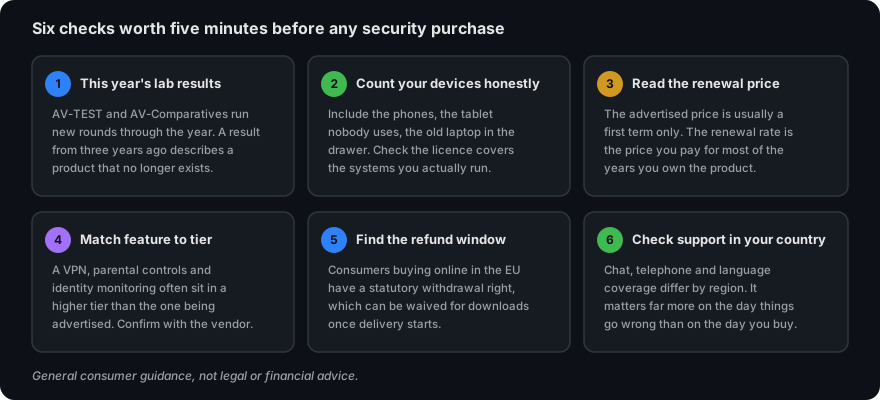
Write down every device in the household that you would mind losing: laptops, desktops, phones, tablets, the machine the children use. Note which operating system each one runs. Now check the licence you are considering against that list.
Two traps here. First, entry-level tiers frequently cover a single device, and a household rarely has one. Second, feature coverage is not uniform across platforms — cloud backup and firewall features are often Windows-only even on a multi-platform licence, so a licence that “covers” your Mac may not give it everything the marketing listed.
3. Read the renewal price, not the first-year price
This is the single most reliable source of complaints in the category. The advertised price is almost always a discounted introductory term. The subscription then renews at the standard rate, which can be substantially higher, and renewal is usually automatic by default.
Do two things at the moment of purchase. Find the renewal rate, which is normally stated on the checkout page and in the subscription agreement, and do the arithmetic across three years rather than one. Then find the automatic-renewal setting in the account area and decide deliberately whether to leave it on. Finding it on the day you buy takes a minute; finding it after an unexpected charge takes an afternoon.
4. Match the feature you actually want to the tier that has it
Security suites are sold in tiers, and the feature a buyer has in mind is frequently in a higher tier than the one being advertised. VPNs, parental controls, identity and dark-web monitoring, cloud backup allowances and multi-device coverage are the usual dividing lines.
Open the vendor’s own comparison table before buying — not a summary on an affiliate site, including this one — and find the row for the feature you care about. If it is not ticked in the column you are about to buy, you are about to buy the wrong tier. Our article on Norton AntiVirus Plus works through one concrete example of exactly this.
5. Check this year’s independent test results
Three laboratories publish comparable consumer results with their methodology attached: AV-TEST in Germany, AV-Comparatives in Austria, and SE Labs in the United Kingdom. All three are free to read.
When you read a round, check its date, check which product was tested rather than which brand, and look at the false-positive column as well as the protection rate. A suite that blocks everything including your own software is not protecting you, it is obstructing you. Prefer the full report to the award graphic: the graphic exists to be reproduced in marketing.
And treat any badge on an affiliate page, including a badge that says “tested”, as marketing until you have found the same result on the laboratory’s own site.
6. Find the refund terms before you pay
Consumers buying online in the EU have a statutory right of withdrawal of 14 days. For digital content supplied immediately, that right can be waived at the point of purchase — often by a checkbox you tick without reading, confirming that you want delivery to start at once and that you lose the withdrawal right when it does. Vendors may separately offer their own money-back guarantee, which is a commercial promise rather than a statutory right.
Those are two different things with two different procedures. Know which one you are relying on before you pay, not after.
7. Check support in your own country and language
Support channels, opening hours and languages vary by region even for the same product. This matters far more on the day something breaks than on the day you buy. Look for the support page for your own country, not the global one.
Things that are worth more than the brand you choose
- A backup you have actually tested. Versioned, and on something not permanently connected to the machine. This is the only reliable answer to ransomware, and no security product replaces it.
- Updates applied promptly to the operating system, the browser and anything facing the internet. A large share of successful attacks use a flaw that was patched months earlier.
- A password manager, and different passwords everywhere. Credential reuse turns one breach at an unrelated site into a compromise of your email.
- Two-factor authentication on email and banking first. Your email account is the reset route to everything else you own.
- A moment of suspicion before acting on any message that creates urgency. Our phishing section shows what to look at.
A paid suite is a reasonable addition to that list. It is a poor substitute for it.
Sources
Testing methodology from AV-TEST, AV-Comparatives and SE Labs, all linked above. Consumer withdrawal rights as set out in Directive 2011/83/EU on consumer rights, as implemented in Czech law. Built-in platform protections as documented by Microsoft and Apple. General threat context from the ENISA Threat Landscape reports.
General consumer information, not legal or financial advice. Where this page diverges from a vendor’s own current terms, the vendor’s information prevails. Illustration on this page is original work created for it.